
Samsung Fridge Not Cooling? Staten Island’s Top Repair Tips For 2025
Introduction
The first sign is small. The milk tastes a bit warm, the ice cream feels soft, and then it hits you: your Samsung fridge is not cooling and every minute means food and money at risk.
In a Staten Island kitchen, that can throw off a busy day fast. Families worry about groceries, landlords get late‑night calls from tenants, and small business owners stress over break‑room or display fridges—concerns echoed in Samsung Refrigerator Reviews 2025 where customers share similar frustrations. We hear this story every week at A‑1 Appliance Parts & Sales Inc., so we wrote this guide to Samsung fridge not cooling problems and repair tips for 2025.
Before anyone spends thousands on a replacement, we suggest a short list of checks. Many “dead” Samsung fridges have simple issues: a bumped setting, a blocked vent, or a unit stuck in demo mode. Other times the problem runs deeper and a pro is the safest choice.
In the next sections we share what we have learned over more than 30 years working on refrigerators across Staten Island: easy DIY checks, simple maintenance habits, and clear signs that it is time to call our team at A‑1 Appliance Parts & Sales Inc. for parts, repair, or a replacement.
What Causes A Samsung Refrigerator To Stop Cooling?
It helps to know how a refrigerator makes things cold. Refrigerant moves in a loop between the compressor, condenser coils, and evaporator coils. The compressor squeezes the refrigerant, the condenser coils release heat into the room, and the evaporator coils absorb heat from inside the cabinet while small fans keep air moving.
On Staten Island service calls, we see the same Samsung refrigerator not cooling causes again and again:
-
Power issues, such as a loose plug or tripped breaker
-
Blocked air vents or overfilled shelves that trap cold air
-
Dirty condenser coils covered in dust and pet hair
-
Failed condenser or evaporator fan motors
-
Defrost systems that stop clearing frost from the coils
-
Worn compressors or sealed‑system problems
-
Units stuck in demo (cooling‑off) mode
Older homes can add weak outlets and tight cabinet cutouts that trap heat around the fridge. In the next sections we move from the easiest checks to the more technical steps, just as we do on a service call.
Essential First Steps: Power And Basic Checks
When someone calls us about a Samsung fridge not cooling, we always start with the basics. These checks do not need tools or parts, and many problems disappear right here, saving the cost of a service visit.
Verify The Power Connection
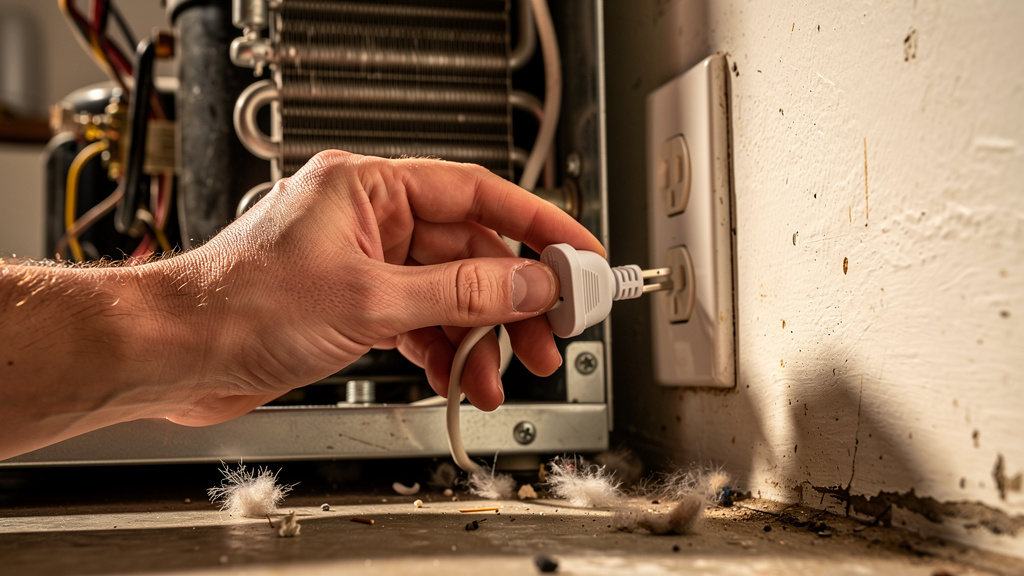
A refrigerator that feels warm may simply not have power, even if kitchen lights are on.
-
Slide the fridge out slightly and make sure the plug is firmly in the outlet. Fridges can “walk” forward over time and tug on the cord.
-
Test the outlet with a small lamp or phone charger. If that does not work either, the outlet, not the fridge, is at fault.
-
Check the electrical panel for a breaker that has tripped. Flip it fully off, then back on to reset.
In many older Staten Island homes, kitchen circuits trip easily, especially when a fridge shares power with a microwave or countertop appliances. If a breaker keeps flipping, call a licensed electrician rather than forcing it back on again.
Inspect Door Seals And Closure
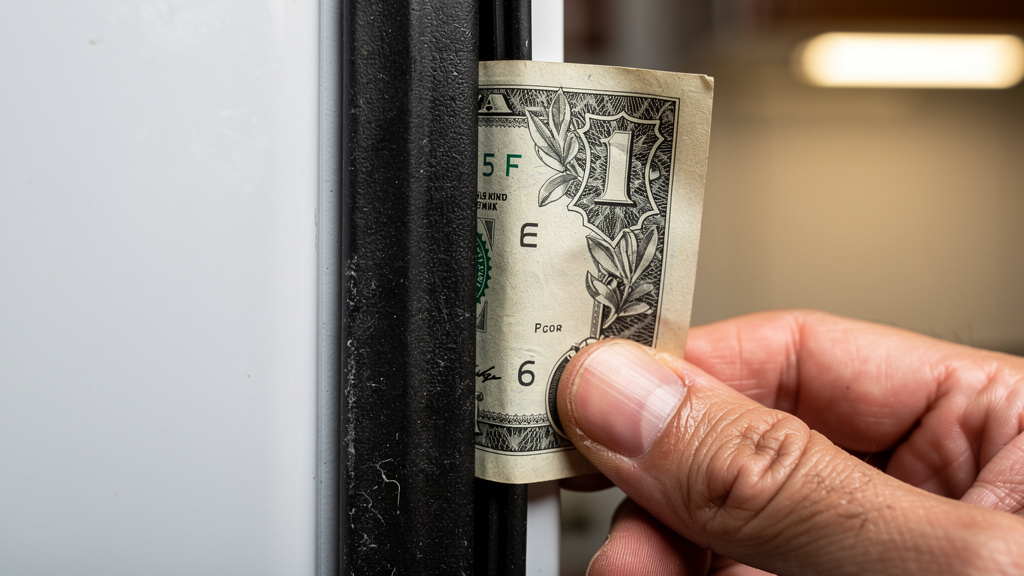
If the fridge is running but the interior still feels warm, the doors may not be sealing tight.
We start with a side view. Doors should sit even and flat against the cabinet, with no gaps. Then we try the dollar‑bill test: close the door on a bill and gently pull. If it slides out with almost no resistance, that section of gasket is weak.
Look for obvious obstacles such as crammed shelves, drawers that are not fully closed, or heavy bottles in door bins that pull the hinges out of line. Clean gaskets with warm, soapy water to remove grease and crumbs so rubber can grip again.
If you see cracks, tears, hard spots, or visible gaps, the gasket needs replacement. At A‑1 Appliance Parts & Sales Inc., we stock genuine Samsung door gaskets so homeowners and property managers can swap worn seals quickly and cut down on wasted electricity.
Adjusting Settings And Deactivating Demo Mode
Once power and door seals look good, the next stop is the control panel. We often find Samsung refrigerators that are perfectly healthy but cannot cool because of wrong settings or demo mode.
Check And Optimize Temperature Settings
Temperature settings change easily: someone brushes the panel while cleaning, a child plays with buttons, or a brief outage resets controls. On most Samsung models, the ideal target is 37°F for the fresh‑food section and 0°F for the freezer.
Controls may be on an external door panel, inside along the top edge, or in a companion phone app on smart models. Set both sections to their recommended values, then give the fridge time to respond.
We suggest waiting a full 24 hours before adjusting again. Dropping the setting lower and lower out of frustration only confuses the system and does not make food cool faster.
How To Turn Off Demo Mode (Cooling Off Mode)
One of the most confusing calls we get is a Samsung fridge with lights and display working but no cold air. Often the panel shows OF, O FF, or similar letters instead of temperatures. That means the unit is in demo mode or cooling‑off mode.
This store setting keeps the compressor off so showrooms can display the fridge without running it. Demo mode can switch on if a certain button combination is held while cleaning or by playful hands. To turn it off, most models use a long button press:
-
Many French‑door units: hold Power Freeze and Fridge together for 8–12 seconds.
-
Many side‑by‑side units: hold Energy Saver and Fridge together for several seconds.
-
Top‑freezer models: steps vary more, so check the manual or the quick‑guide sticker inside the cabinet.
When demo mode shuts off, you usually hear a chime and the display returns to normal temperatures. Cooling can take 6–24 hours to stabilize, so keep doors closed as much as possible.
If none of the standard steps work, call or visit A‑1 Appliance Parts & Sales Inc. with your full model number and we will talk you through the exact button sequence.
Environmental Factors That Impact Cooling Performance
Even a perfectly working Samsung fridge can struggle if conditions around it fight against cooling. On Staten Island we pay close attention to tight kitchens, older cabinets, and hot summer rooms.
Good placement helps a lot:
-
Leave at least 1 inch between the back of the fridge and the wall, plus a bit of space on each side and above, so warm air from the condenser can escape.
-
Avoid placing the fridge right next to a range, dishwasher, radiator, or large sunny window.
-
Try to keep room temperature between about 60°F and 90°F. Units kept in unheated garages or enclosed porches often have control problems.
Inside the cabinet, do not push food tight against air vents. Cold air needs clear paths, or you will see warm spots even when the system itself is fine. When we move a fridge to a better location, we always level it so doors swing closed by themselves and gaskets seal well.
As our technicians like to say, “A refrigerator cools the air inside, but it has to dump that heat somewhere.”
Cleaning And Maintaining Critical Components
After basic checks and settings, we move to maintenance that keeps a Samsung fridge cooling well for years. Many Staten Island homeowners handle these tasks themselves with a little guidance.
How To Clean Condenser Coils
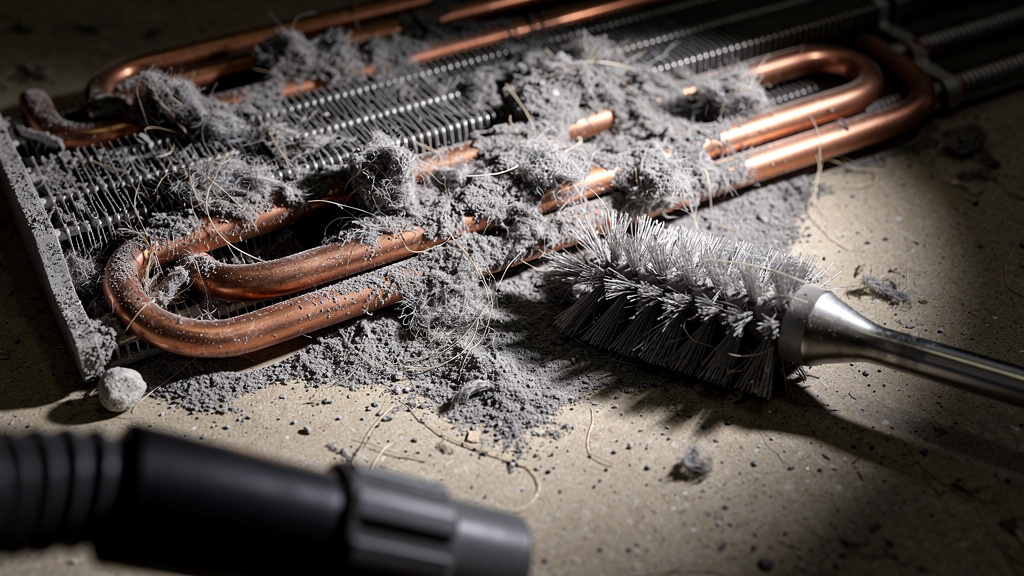
Condenser coils are the part of the fridge that dumps heat into the room. When they are wrapped in dust and pet hair, that heat has nowhere to go. The compressor then runs longer and harder, raising electric bills and shortening its life.
Most Samsung models place the coils behind a lower front grill or a small rear panel near the compressor. To clean them safely:
-
Unplug the refrigerator or switch off the breaker.
-
Remove the grill or rear panel.
-
Use a coil brush and a vacuum with a soft brush attachment to loosen and remove dust. Work gently so you do not bend the thin metal fins.
-
Sweep and vacuum the floor under and behind the fridge before sliding it back.
For most homes, we suggest coil cleaning about every 6 months. Homes with multiple pets or near busy streets may need it every 3 months. Never spray water or harsh cleaners on the coils. When our technicians from A‑1 Appliance Parts & Sales Inc. visit a home, we include a quick coil check and cleaning whenever we can reach them.
Inspecting And Testing Fan Motors
Two small fans have a big effect on cooling. The condenser fan, near the compressor, blows air across the condenser coils. The evaporator fan, hidden behind a panel in the freezer, moves cold air through both the freezer and fresh‑food sections.
We listen first. If the compressor is running but there is no soft fan sound at the back, the condenser fan may be stuck or burned out. Inside the cabinet, a cold freezer and a warm fridge section often point to an evaporator fan issue. High‑pitched squeals or chirps from the freezer also suggest a worn motor.
With the unit unplugged, remove the rear panel and spin the condenser‑fan blades by hand. They should move freely without grinding. Inside the freezer, take off the back panel and check whether ice has built up around the evaporator fan. If the blades are stiff or the fan does not run when the fridge is plugged in and calling for cooling, the motor likely needs replacement.
At A‑1 Appliance Parts & Sales Inc., we keep many Samsung fan motors on the shelf, which often means a same‑day fix instead of waiting for parts to ship.
Addressing Frost Buildup And Defrost System Issues
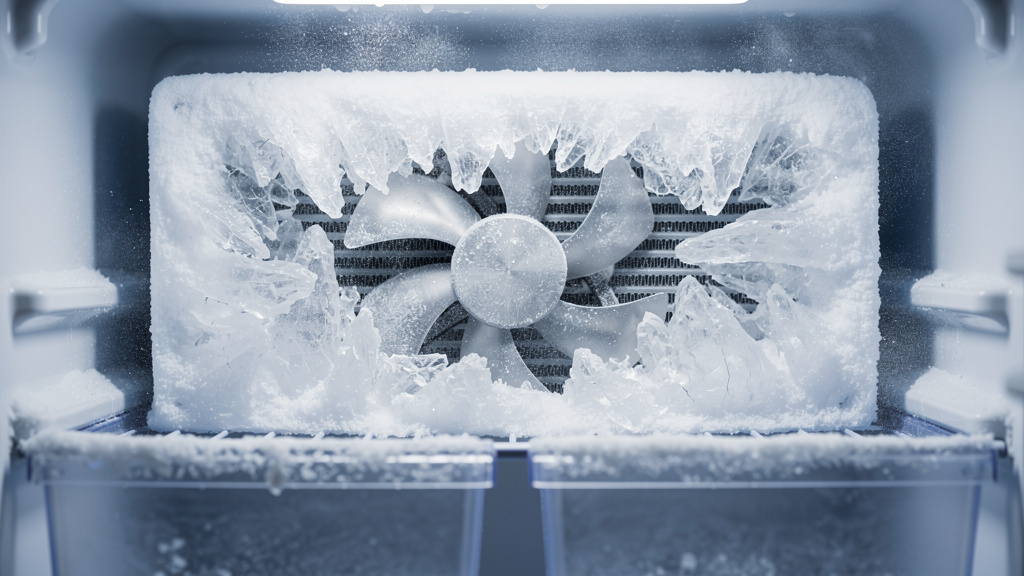
Heavy frost in a freezer is more than cosmetic; it can block airflow and stop a Samsung fridge from cooling. Frost often builds on the back freezer wall, around the evaporator fan, and on the evaporator coils behind the inner panel.
A light coating can be normal, but a thick snowy layer or solid sheet of ice acts like a blanket. Cold gets trapped in one spot, the fan cannot move air, and the fridge section warms up.
When we suspect this, we often guide customers through a manual defrost:
-
Move food to coolers with ice packs.
-
Unplug the refrigerator and prop doors open.
-
Place towels on the floor to catch melting water.
-
Wait 8–24 hours for all ice to melt. Do not use hair dryers, heat guns, or sharp tools; they damage plastic parts and coils.
-
Wipe the interior dry, plug the unit back in, and restore normal settings.
If the fridge cools well for a few days and the frost returns quickly, the automatic defrost system is not working. That system includes a heater that warms the coils, a thermostat that senses temperature, and a timer or control board that starts the cycle. A failed heater, thermostat, or board can all cause repeat frost.
Manual defrosting is a good short‑term fix and a helpful test. If ice keeps coming back, it is time for proper diagnosis. For Staten Island residents, we stock Samsung defrost heaters, thermostats, and control boards at A‑1 Appliance Parts & Sales Inc., and we help match the right part to each model.
When To Call Professional Repair Services In Staten Island
DIY steps solve many Samsung refrigerator not cooling issues, but some problems call for a professional.
Certain signs point to sealed‑system or compressor trouble: a compressor that runs almost nonstop while both sections stay warm, loud grinding or repeated clicking from the compressor area, or oily spots and strong chemical smells near the tubing. By law, only certified technicians can open and recharge sealed refrigerant systems.
Electronics are another limit for most do‑it‑yourself work. A failing control board can cause random cooling, flashing error codes, dead displays, or a mix of strange symptoms. While a simple power reset is worth trying, repeated issues often require test equipment and experience.
At A‑1 Appliance Parts & Sales Inc., our technicians test compressor performance, measure pressures, and read board signals instead of guessing. Because we are also Staten Island’s dedicated appliance‑parts supplier, we can often pull the exact Samsung fan, sensor, or board from our shelves the same day. We give clear pricing, explain when repair makes sense and when replacement is smarter, and back parts and labor with a solid warranty.
One of our techs likes to say, “You do the easy checks, we handle the dangerous ones.”
Preventive Maintenance Tips To Avoid Future Cooling Problems
Once a Samsung fridge is cooling again, the goal is to keep it that way. Regular maintenance takes far less time and money than an urgent repair call.
Every few months, do a quick review:
-
Wipe door gaskets and look for new cracks or stiff spots.
-
Make sure doors close smoothly and sit even.
-
Find the air vents inside the fridge and freezer and move any boxes that block them.
-
Glance at the back freezer wall for early frost patterns.
-
While the fridge is running, listen for new buzzing, squealing, or rattling sounds.
Twice a year, go a little deeper: clean the condenser coils, check the drain pan if you can reach it, and place a small thermometer on a middle shelf to confirm that real temperatures match the display. Test the ice maker and water dispenser if your model has them.
Daily habits also matter. Avoid overfilling shelves so air can move, and plan where items live so doors do not stay open while someone hunts for a jar. Keeping the fridge about 70–80% full balances air space with food mass.
For Staten Island homeowners who prefer a professional check, we offer annual refrigerator checkups at A‑1 Appliance Parts & Sales Inc. to find small issues before they turn into big ones.
Key Takeaways
Here is a short recap of Staten Island’s top tips for a Samsung fridge that is not cooling:
-
Start With Simple Checks. Confirm power at the outlet and breaker, inspect door seals, clear blocked vents, and reset temperature settings. Many non‑cooling calls end at this stage with no parts needed.
-
Watch Airflow Inside And Out. Give the fridge breathing room, keep it away from strong heat sources, and clean condenser coils on a schedule. Inside, avoid overstuffed shelves and blocked vents so cold air can reach every corner.
-
Know When To Call A Pro. Repeat frost buildup, loud compressor noises, error codes that return, or warm temperatures after 24 hours of normal operation all point toward professional service. With parts, repair, and appliance sales under one roof, A‑1 Appliance Parts & Sales Inc. is ready to help Staten Island homeowners and property managers at any stage.
Conclusion
A Samsung fridge that stops cooling can turn a normal day on Staten Island into a race against the clock. The good news is that many problems have simple fixes: checking power, confirming settings, turning off demo mode, cleaning coils, and clearing vents often bring temperatures back to normal.
We want readers to feel confident handling those first steps and just as confident calling us when the problem runs deeper. Compressors, sealed systems, and control boards need trained hands and the right parts, and that is where our experience at A‑1 Appliance Parts & Sales Inc. makes a real difference.
Whether you need a small gasket, a specialized fan motor, expert diagnosis, a full repair, or a brand‑new refrigerator, we can usually help in one visit. Do not let a warm fridge spoil the week—reach out to A‑1 Appliance Parts & Sales Inc. for expert Samsung refrigerator service on Staten Island. Call our shop or visit our website for current hours and contact options, and we will be ready to help.
FAQs
Question 1: How Long Should I Wait For My Samsung Refrigerator To Cool After Plugging It In Or Changing Settings?
In most cases, allow 6–12 hours for the first cooldown after plugging in or changing temperature settings, and up to 24 hours for full stabilization. During that time the compressor may run almost nonstop. Keep doors closed as much as you can and use a simple fridge thermometer on a middle shelf to confirm real temperatures.
Question 2: Can I Use My Samsung Refrigerator If It Is Not Cooling Properly Or Should I Unplug It?
Food safety comes first. If the fridge section stays above 40°F for more than about 2 hours, most perishable food should be discarded. While you test basic steps, keep doors closed and move important items to coolers with ice. Unplug the fridge before manual defrosting or removing panels, and shut it off right away if you hear loud grinding or repeated clicking near the compressor.
Question 3: How Much Does It Typically Cost To Repair A Samsung Refrigerator That Is Not Cooling In Staten Island?
Costs depend on the cause of the Samsung refrigerator not cooling issue. Simple fixes such as coil cleaning or new door seals often run $100–$200. Replacing fans, thermostats, or sensors may fall around $200–$400. Major sealed‑system or compressor work can reach $600–$1,200. Many shops charge a diagnostic fee, which is often credited toward the repair. At A‑1 Appliance Parts & Sales Inc., we pair diagnosis with clear advice on when repair or replacement makes more sense.
Question 4: Are Samsung Refrigerators Reliable Or Do They Have Common Cooling Problems?
From what we see in the field, Samsung refrigerators give solid performance but certain models share repeating issues, such as ice‑maker troubles that affect airflow, defrost systems that stop clearing frost on some French‑door units, and occasional control‑board glitches. These patterns are similar to other major brands. Regular maintenance—clean coils, good door seals, clear vents—does more for long‑term reliability than the logo on the door.
Question 5: What Should I Do If My Samsung Fridge Stopped Cooling After A Power Outage?
After an outage, first confirm that the outlet and breaker are back on, since surges can trip breakers even when other lights work. Do a controlled reset by unplugging the fridge for 5–10 minutes and plugging it in again. Check the display for odd codes such as OF or O FF that suggest demo mode. Once power is stable, give the fridge 12–24 hours to cool. If it still will not cool, a surge may have damaged a board, compressor, or sensor, and that is the time to call A‑1 Appliance Parts & Sales Inc. for a full checkup.